Sidecars, windows and cells
A viewer has three places to live in JupyterLab, and every one of them is a CadViewer with the complete CAD Viewer inside.
Where a viewer lives
A sidecar — a panel docked beside the notebook that can be shown and hidden with one click:
open_viewer("CAD")            # opens the sidecar, showing the logo
show(part)                    # draws into it
or in one step, since showing into a title that does not exist yet opens it:
show(part, viewer="CAD")
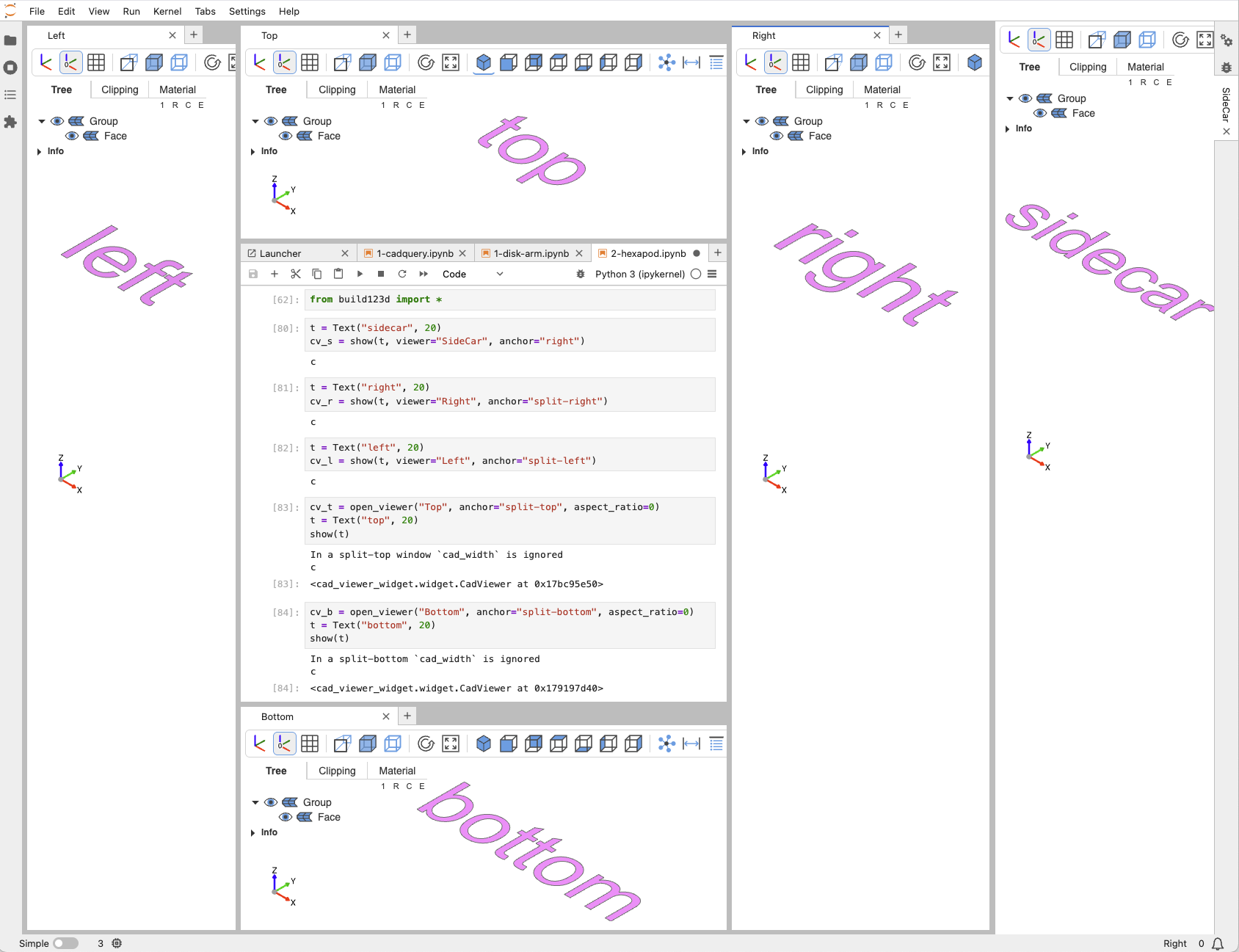
A window — a separate JupyterLab window, placed by anchor:
open_viewer("Top", anchor="split-top", aspect_ratio=0)
show(part)
show(part, viewer="Left", anchor="split-left")
anchor is one of "right" (the sidecar, the default), "split-right", "split-left", "split-top" and "split-bottom". It is chosen when the viewer is opened and cannot be changed afterwards; close the viewer and open it again.
A cell — with no sidecar open, show puts the viewer into the cell's output, where it stays with the notebook:
show(part) # no open_viewer before: a cell viewer
Size
A sidecar or window fills the space JupyterLab gives it and follows every resize. aspect_ratio constrains that: open_viewer("CAD", aspect_ratio=0.75) keeps the canvas at that height-to-width ratio inside the panel, aspect_ratio=0 fills the panel — the default. Naming both cad_width and height for a sidecar describes the same proportion; either alone is ignored.
A cell viewer is sized by the caller and never resized: cad_width and height (defaults 800 × 600) are its pixels. pinning=True (the default) gives it a pin button that replaces the live viewer with a PNG of the current view — a notebook full of pinned cells stays small and needs no kernel to look at.
cad_width, height, pinning and anchor are this viewer's own show keywords; the other viewers size themselves and refuse them.
Addressing a viewer
A sidecar is named, not dialled. The viewer= keyword — accepted by every show* command and by every function that acts on a viewer (status, set_viewer_config, workspace_config, combined_config, reset_defaults, save_screenshot, export_html, …) — resolves the same way everywhere:
viewer="<title>"names that sidecar or window. Forshowa title nothing was opened under opens a new viewer; for the config functions it addresses nothing —status()answers{},set_viewer_configchanges nothing — and onlyexport_htmlsays so.- Without it, the default viewer is used: the last one opened with
default=True, which is whatopen_viewerdoes unless told otherwise.set_default_viewer("Left")moves the default;get_default_viewer()says which it is. - Without a default viewer, the viewer the last
showproduced — which is how a cell viewer, unnamed by nature, is reached.set_viewer_config(tab="clip")after a cell show configures that cell's viewer, andstatus()reads it.
open_viewer("Left", anchor="split-left")
open_viewer("Right", anchor="split-right")     # now the default
show(a)                                        # -> Right
show(b, viewer="Left")
set_viewer_config(axes=True, viewer="Left")
status()                                       # -> Right's state
Managing viewers
open_viewer(
    title, anchor="right", default=True,
    cad_width=None, height=None, aspect_ratio=None, tree_width=250,
    theme="browser", glass=True, tools=True, pinning=True,
)
opens a sidecar or window showing the logo, makes it the default unless default=False, and returns its CadViewer. The rest:
| function | what it does |
|---|---|
close_viewer(title) |
Close one sidecar or window and release its widgets. |
close_viewers() |
Close all of them. |
get_viewer(title=None) |
The CadViewer behind a title, or the default one; None if there is none. |
get_viewers() |
All open sidecars and windows, by title. |
get_viewer_by_id(id) |
The same, by widget id — what the measurement backend addresses. |
get_viewers_by_id() |
All of them, by widget id. |
set_default_viewer(title, anchor="right") |
Make a viewer the default, opening it first if it does not exist. |
get_default_viewer() |
The title of the default viewer, or None. |
show returns the CadViewer it drew into, so cv = show(part) gives you the same handle without looking it up. Its properties mirror the viewer's state (cv.zoom, cv.position, cv.tab, …), and setting one changes the viewer — the same thing set_viewer_config does by keyword.