Analysis tools
Three analysis tools live in the toolbar — Distance, Properties and Select — one active at a time, and mutually exclusive with explode. Measure mode covers the first two, Object selection the third; the picking mechanics here are shared by all of them. A fourth has no toolbar button: Coordinate selection, Cmd-C / Ctrl-C over the model.
Picking and filters
-
v/e/f/son the keyboard (or the filter dropdown in the toolbar) restrict highlighting and picking to vertices / edges / faces / solids;nclears the filter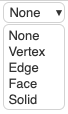
-
ESCclears all selections;backspaceor right-click removes only the last one
Programmatic activation
The active tool can be selected from Python with analysis_tool=, which is accepted by every show* command and by set_viewer_config:
from ocp_viewer_core.viewer import show, set_viewer_config, AnalysisTool

show(part, analysis_tool=AnalysisTool.PROPERTIES)
# or, on an already-running viewer:
set_viewer_config(analysis_tool=AnalysisTool.DISTANCE)
Allowed values: AnalysisTool.PROPERTIES, AnalysisTool.DISTANCE, AnalysisTool.SELECT, AnalysisTool.OFF. The string equivalents "properties", "distance", "select", "off" also work — see AnalysisTool.
Mesh-based and exact numbers
Two kinds of numbers appear, and the panel titles say which: the continuous hover readout is mesh based — computed from the tessellation, instant, approximate. The measurement tools themselves ask the viewer's Python measurement backend, which computes on the exact BRep geometry, so the panel numbers are CAD-exact; only where no backend is reachable do the panels fall back to mesh-based values and title themselves "(mesh based)".