Parameters
A model whose values you want to change without editing the code — the length of a stand, the number of holders, whether there is a candle in the middle — can be a function with a @ui decorator. Studio then shows a small floating window with a control per parameter, and every change calls the function again and shows the result.
The decorator
from build123d_studio import Param, ui

@ui({
    "Candle Stand": {
        "length": Param(choice={"large": 70, "medium": 50, "small": 30}, desc="Length of candle stand"),
        "radius": Param(desc="Radius of ring of stand"),
    },
    "Number of candle holders": {
        "count": Param(interval=(3, 14), desc="Number of candle holders"),
        "center_candle": Param(desc="Do you want center Candle"),
    },
})
def candle_stand(length: int = 50, radius: int = 25, count: int = 7, center_candle: bool = True) -> Part:
    ...
The signature stays plain Python: the name, the type annotation and the default of each parameter are what the window shows, and they are written only there. The decorator adds what a signature cannot say — a group heading, a description, a slider, a dropdown — keyed by the parameter's name. Take the decorator away and the function is exactly what it was.
ui() takes a dict of groups, each a dict of parameter names to Param. A Param at the top level is a parameter without a group. The order of the window is the order of the decorator, not of the signature.
Param has four fields, all optional:
| Field | Effect |
|---|---|
desc |
The label beside the control. Without it, the parameter's name. |
choice |
{label: value}: a dropdown. The value goes to the function; the label is what the dropdown shows. |
interval |
(lo, hi): a slider between the two. |
step |
What one click of a number field's buttons, or one notch of the slider, changes the value by. Default 1. |
The control is decided by the annotation where the Param says nothing: bool is a checkbox, int and float are number fields with a step up and a step down, anything else is a text field — a parameter without an annotation too, and its value reaches the function as a string, so annotate what the window should show. A float always shows a decimal point — 3.0, never 3 — and as many decimals as its step has: with step=0.25 the field reads 3.25.
A parameter that has a default may be left out of the decorator; it is not in the window and the function's own default fills it. A parameter without a default cannot be left out, and Studio says so when the function is defined. A name that is not a parameter is refused in the same way, so a parameter renamed in the signature but not in the decorator cannot silently vanish from the window.
The window
Run the code on the kernel — Run All, or the cell that defines the function. When the kernel goes idle, Studio finds every @ui function in its namespace and opens the parameter window for it. If there are several, a dropdown in its header picks one. Run File and Debug File run the file in a process of its own, so nothing they define reaches the kernel and no window appears. The window's call is show(...), so the script needs from build123d_studio import show — the line the new-file template starts with.
The window floats above the panes: drag it by its header to wherever it is least in the way — beside the viewer, usually — and it comes back there next time. Its width is fixed; it scrolls when the parameters do not fit.
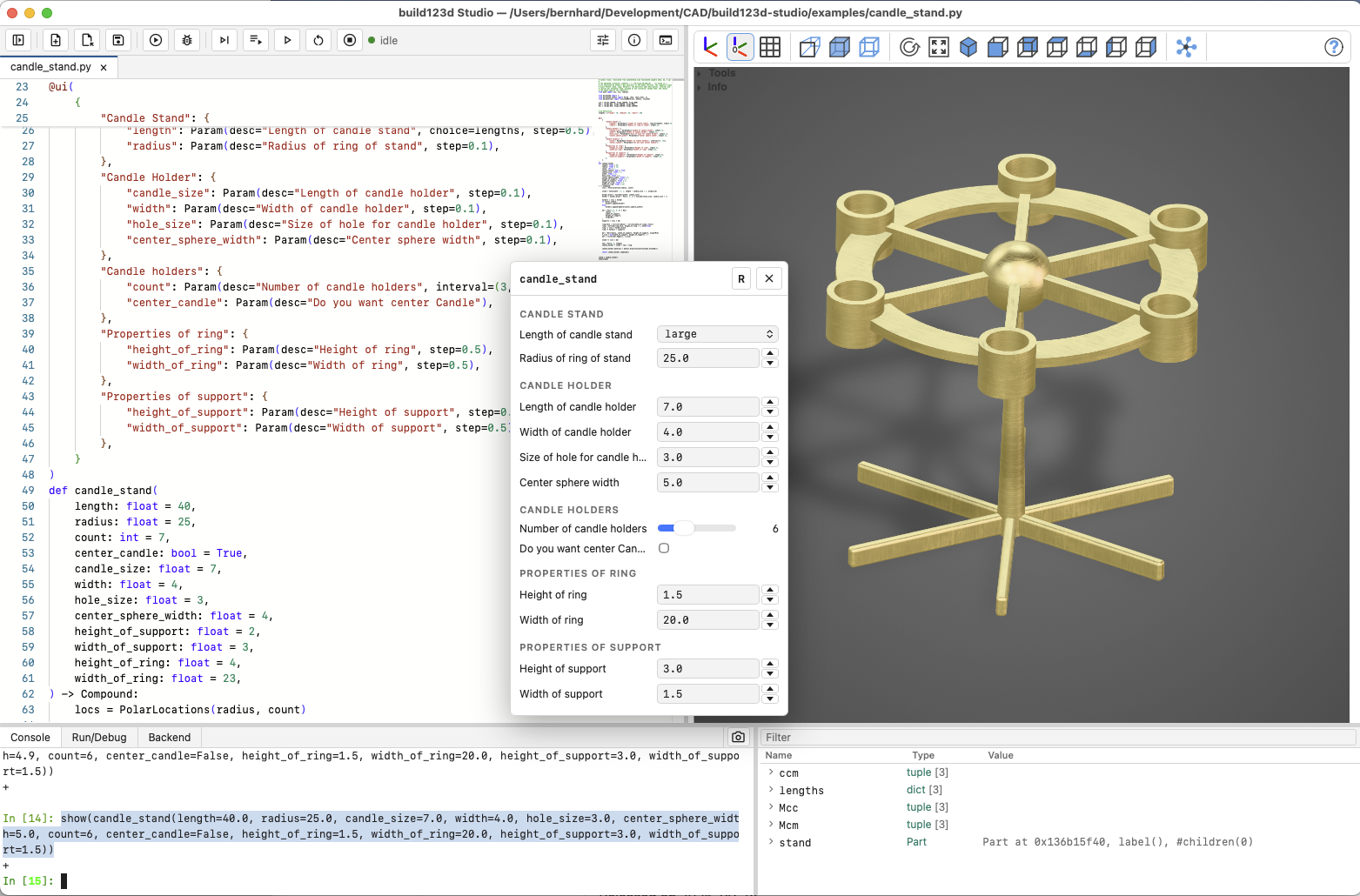
Changing a control calls the function with every parameter the window shows, by keyword, and shows the result:
show(candle_stand(length=70, radius=25, count=9, center_candle=True))
The line is written to the log, not to the console, and the tab in front of the console stays where it was. A slider sends its value when it is released, not while it is dragged. A number field sends on Enter or when it loses the focus; a field that does not hold a number is marked and sends nothing until it does. The step buttons step from what the field shows, or from the last good value when the field holds nothing usable.
Quick clicks are one call, not one each: the window waits 200 ms after the last change before calling. And a change made while the kernel is still building the previous one is held and sent once when it is done, with the values as they are then — so however fast you click, at most one rebuild is running and one is waiting.
R puts every control back to the script's values and shows that. ✕ and Escape close the window; View ▸ Toggle Parameters brings it back. A closed window stays closed through what is not a Run — a line in the console, a refresh — and comes back with the next Run from the editor, which also starts it over from the script's values: after a Run the viewer shows what the script shows, and so does the window. The values you have dialled in survive the calls the window itself makes. Restarting the kernel closes the window; the function it described is gone.
The result is not bound to a name. candle_stand() in the script and show(candle_stand(...)) from the window are two calls of the same function, and only the script's assigns.
The example
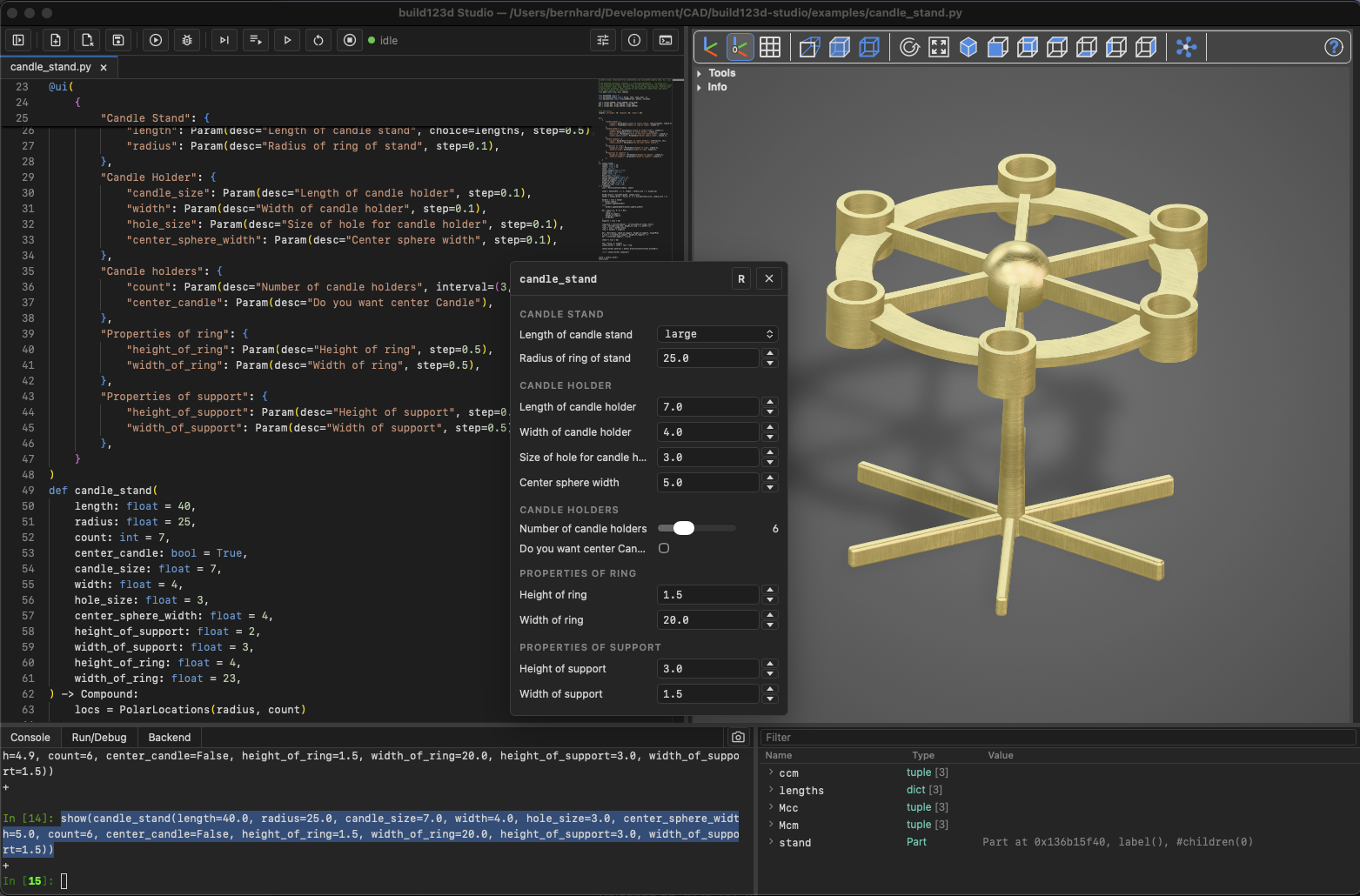
candleStand.scad from the OpenSCAD examples, translated to build123d — examples/candle_stand.py in the Studio repository. Its customizer comments (// [70:large,50:medium,30:small], /* [ Candle Holder ] */) are what the decorator replaces. Open it in Studio and run it with Run All; the window appears with five groups, and the dropdown, the slider and the checkbox are the three kinds of Param at work.
# Candle stand, translated from candleStand.scad (build123d algebra mode, mm, Z up)
#
# The OpenSCAD customizer comments (`// [70:large,50:medium]`, `/*[ Group ]*/`)
# are expressed by Studio's @ui decorator on the model function. The signature stays
# plain Python (name, type, default); the decorator adds description, interval and
# choices per parameter name, grouped as the customizer showed them, and checks
# the names against the signature.
from math import cos, sin, radians

from build123d import *
from build123d_studio import Param, show, show_clear, ui
from bd_materials import FinishedMaterial, metals, finishes

ccm = (Align.CENTER, Align.CENTER, Align.MIN)
Mcm = (Align.MAX, Align.CENTER, Align.MIN)
Mcc = (Align.MAX, Align.CENTER, Align.CENTER)


# UI definition
lengths = {"large": 70, "medium": 50, "small": 30}


@ui(
    {
        "Candle Stand": {
            "length": Param(desc="Length of candle stand", choice=lengths, step=0.5),
            "radius": Param(desc="Radius of ring of stand", step=0.1),
        },
        "Candle Holder": {
            "candle_size": Param(desc="Length of candle holder", step=0.1),
            "width": Param(desc="Width of candle holder", step=0.1),
            "hole_size": Param(desc="Size of hole for candle holder", step=0.1),
            "center_sphere_width": Param(desc="Center sphere width", step=0.1),
        },
        "Candle holders": {
            "count": Param(desc="Number of candle holders", interval=(3, 14)),
            "center_candle": Param(desc="Do you want center Candle"),
        },
        "Properties of ring": {
            "height_of_ring": Param(desc="Height of ring", step=0.5),
            "width_of_ring": Param(desc="Width of ring", step=0.5),
        },
        "Properties of support": {
            "height_of_support": Param(desc="Height of support", step=0.5),
            "width_of_support": Param(desc="Width of support", step=0.5),
        },
    }
)
def candle_stand(
    length: float = 40,
    radius: float = 25,
    count: int = 7,
    center_candle: bool = True,
    candle_size: float = 7,
    width: float = 4,
    hole_size: float = 3,
    center_sphere_width: float = 4,
    height_of_support: float = 2,
    width_of_support: float = 3,
    height_of_ring: float = 4,
    width_of_ring: float = 23,
) -> Compound:
    locs = PolarLocations(radius, count)

    stand = Cone(width - 2, 1, length - candle_size / 2, align=ccm)

    holder_block = Cylinder(width, candle_size)
    holder = holder_block - Pos(0, 0, 1) * Cylinder(hole_size, candle_size + 1)

    holders = locs * holder
    if center_candle:
        holders.append(holder)
    else:
        holders.append(Sphere(center_sphere_width))

    bar = Pos(-3.5, 0, 0) * Box(
        radius - 7,
        width_of_support,
        height_of_support,
        align=Mcc,
    )
    supports = locs * bar

    ring_face = (Circle(radius) - Circle(width_of_ring)).face()
    ring = extrude(ring_face, height_of_ring / 2, both=True)
    ring -= locs * holder_block
    ring += holders + supports

    bar = Box(radius, width_of_support, height_of_support, align=Mcm)
    f_size = min(width_of_support, height_of_support) / 3
    bar = fillet(bar.edges(), f_size)

    stand += locs * bar

    top = Pos(0, 0, length)
    candle_holder = stand + top * ring

    candle_holder.material = metals.brass(finish=finishes.brushed())

    return candle_holder.compound()


stand = candle_stand()
show(stand)