Architecture
Four viewers, one behavior — because almost everything is one shared implementation, and each viewer adds only what is genuinely its own.
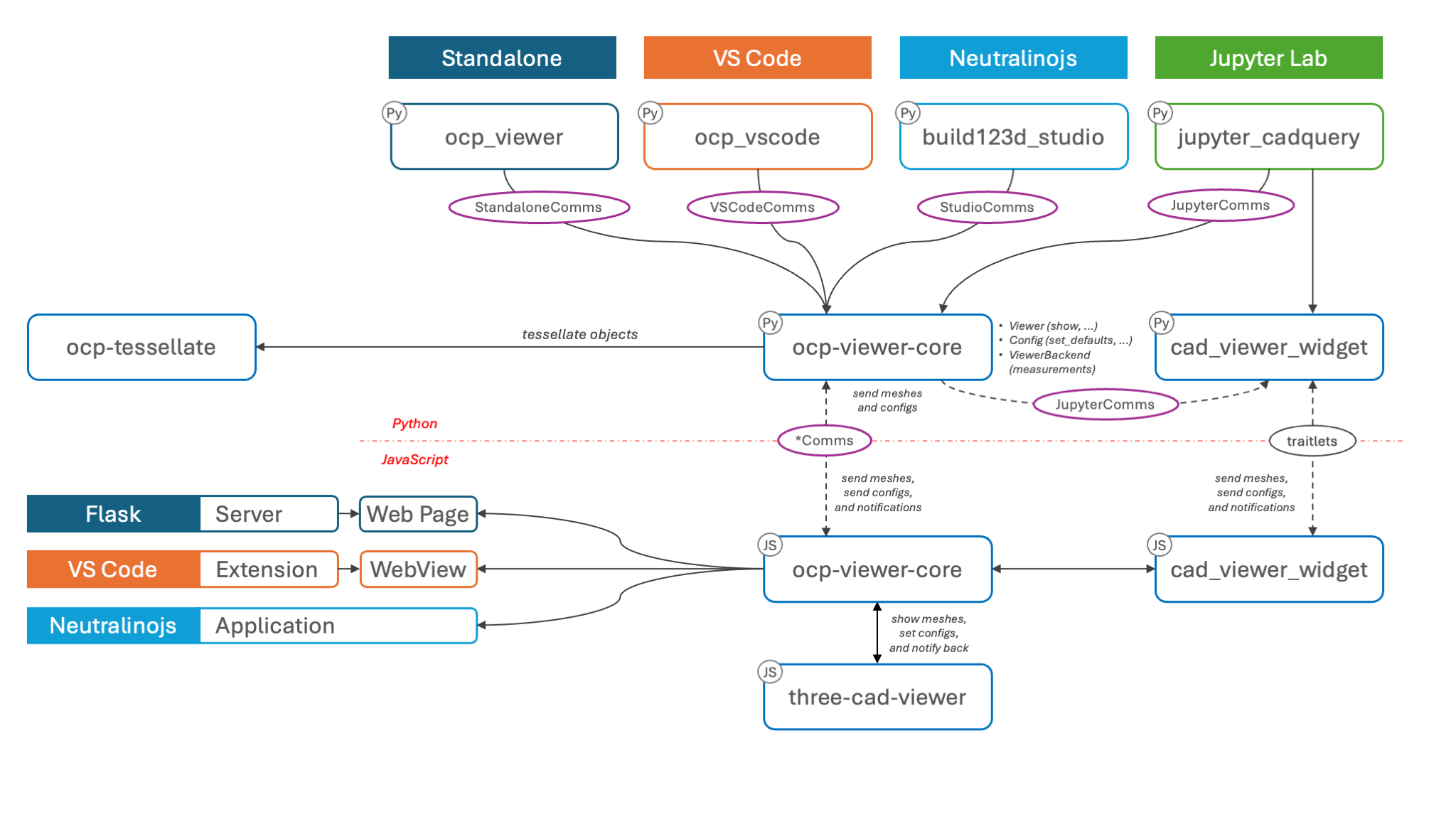
Dependencies of the viewer ecosystem
The pieces
- ocp-viewer-core is the shared half, and it is two halves itself: a Python package on PyPI (the show pipeline, the configuration semantics, the measurement backend, the wire protocol) and a JavaScript package on npm (the viewer page that embeds the renderer, applies configs, and reports changes back). Both are published together under one version, so which version of the pair a viewer has is one question rather than two.
- three-cad-viewer is the renderer: the CAD Viewer window itself, built on three.js. It knows nothing about CAD kernels — it draws tessellated meshes.
- ocp-tessellate turns OCP/build123d/CadQuery objects into those meshes — see Mesh creation.
- The four viewer packages —
ocp_vscode,ocp_viewer,jupyter_cadquery(withcad-viewer-widget),build123d_studio— each supply exactly three things: a transport (how a message travels from Python to their embedded CAD Viewer — see Communication), a settings store (see Configuration layers), and their own surface (a VS Code panel, a web page, a notebook sidecar, a desktop window).
This is why the docs can be shared: the behavior is not merely similar across viewers, it is the same code. A differing default or missing feature between viewers is treated as a defect, not a flavor.
What happens when you call show()
The one narrative that ties the pieces together:
- Read — the show asks the viewer two questions: its stored settings (
workspace_config) and its live state (status), and merges them withset_defaultsvalues and the call's own keywords into the effective configuration. - Tessellate — ocp-tessellate converts the CAD objects into meshes, honoring
deviationandangular_tolerance, reusing cached and repeated shapes. - Send — the model and its config block travel over the viewer's transport; the config keys are translated to the renderer's naming on the way out.
- Render — the shared page hands the meshes to three-cad-viewer, applies the config, and positions the camera per
reset_camera. - Feed the backend — the id-to-shape mapping of what was just drawn goes to the measurement backend, so later picks can be answered with exact geometry.
- Notify back — from then on, everything you change in the viewer (a toggle, a slider, a selection) is reported back to Python as it happens, which is how
status()answers without asking the browser and how the next show can preserve what you changed.
The splash logo
Before the first show, every viewer displays the OCP splash logo — and it is a real model, shipped in two forms: as tessellated data for the renderer, and as measurable geometry for the backend, so even the splash can be measured. It carries its own display settings, which is why it must never be used to verify your configuration — the first real model is the honest test.